Markdown,
made for reading.
A fast, native viewer for READMEs, notes, docs and plans. Press Space in Finder for a preview — or open the file and read it like a real document.
Launch plan
A clear path from the first build to the Mac App Store.
This week
| Stage | Owner | Status |
|---|---|---|
| Renderer | Andreas | Done |
| Shell | Sam | Review |
| Quick Look | Sam | Next |
Notes
- Keep the source file untouched.
- Open a 1 MB file in less than 300 ms.
Plain text in.
A real document out.
Markko formats every part of a Markdown file the way it was meant to look — and never changes the file itself.
Tables you can read.
Pipes and dashes become clean tables with aligned columns. Task lists get real checkboxes, nested lists keep their indent.
| Item | Q1 | Q2 |
|---|---|---|
| Hosting | €120 | €140 |
| Design | €900 | — |
| Total | €1,020 | €140 |
☑︎ Send invoice
☐ Renew domain
☐ markko.app
Code that reads like code.
Fenced blocks get syntax highlighting for every common language, in colours that match your theme.
export async function deploy() {
  const build = await compile()
  // publish, then check health
  await publish(build, { region: "fra1" })
  return healthcheck(3)
}
The parts other viewers skip.
Front matter turns into a tidy Properties block. Footnotes, links to headings and images next to your file just work.
Kyoto, day two
Fushimi Inari before 8 am — the crowds come later1. See Getting around.
1 Trains from Kyoto Station run every 10 minutes.
Every .md file,
one keystroke away.
Finder, the Desktop, Spotlight and Open dialogs — wherever macOS previews a file, Markko formats your Markdown. Turn on Quick Look
Markko
The Markdown viewer for Mac.
Install
Get it from the Mac App Store, open it once, then press Space on any .md file.
| Shortcut | Does |
|---|---|
| ⌘F | Find |
| ⌃1–⌃4 | Switch profile |
Weeknight pasta
Serves two · 20 minutes
You need
☑︎ 200 g spaghetti
☑︎ 2 cloves garlic, olive oil
☐ parmesan
☐ chili flakes
1.0.1
Fixed: the outline no longer hides under the tab bar.
Improved: live reload on network drives.
1.0.0
First release.
Japan, spring
| Day | City | Stay |
|---|---|---|
| 1–3 | Tokyo | Booked |
| 4–5 | Kyoto | Open |
| 6 | Osaka | Open |
“Finally a Markdown viewer that feels like it came with the Mac. I press Space, I read, I move on.”Name Surname · Role, Companyplaceholder — real App Store review after launch
Comments, diagrams,
git and export.
Leave comments next to any file, see what changed since the last commit, read Mermaid diagrams and KaTeX formulas, and export to PDF or HTML. One purchase, all your Macs.
```mermaid
graph LR
  Client --> API
  API --> Database
  API --> Queue
```

## Budget

$$\bar t = \frac{1}{n}\sum t_i$$
Theme, diagrams and links kept
Make sense of
the whole document.
All features ›The file changes.
Your view follows.
Write in VS Code, Zed, iA Writer or Obsidian. Every save shows up at once — and you keep your place on the page.
Launch plan
| Step | Owner | Status |
|---|---|---|
| Build the reader | Andreas | Done |
| Review the details | Sam | Review |
One viewer.
Every kind of read.
Save theme, fonts, size and column width as profiles. Switch with ⌃1–⌃4 — Quick Look, Export and Print follow.
3The quiet power of plain text
5Plain text outlives every app it was written in. Markdown adds just enough structure to make it pleasant to read — headings, lists, emphasis, links.
8Markko shows it the way it was meant to be read, in the style that fits the moment.
Notes in the margin.
Source untouched.
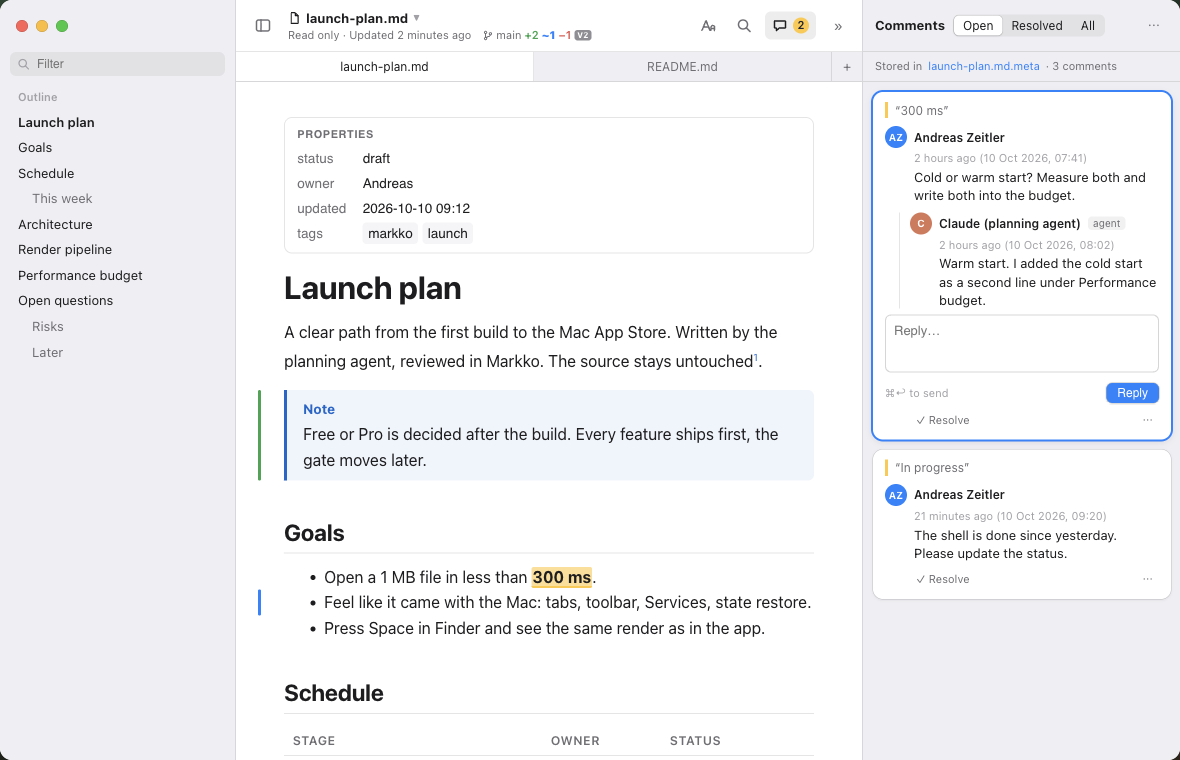
Select a passage, press ⇧⌘K and leave a note. Comments live in a small file next to your Markdown — easy to share, easy to read back.
Proposal
We open the new office in March, with a team of eight and a budget of €40k for the first quarter.
Hiring starts in January.
Diagrams, rendered
right in the text.
Mermaid flowcharts, sequence, state, Gantt and ER diagrams, and KaTeX formulas — offline, and in Quick Look too. Click a diagram to see it full screen.
The whole picture.
t̄ = 1⁄n Σ ti ≤ 200 ms
Every .md file,
one keystroke away.
Finder, the Desktop, Spotlight and Open dialogs — wherever macOS previews a file, Markko formats your Markdown, in your theme.
Markko
A native Markdown viewer.
brew install … ✗
App Store ✓
Pasta
☑︎ 200 g spaghetti
☑︎ garlic, oil
☐ parmesan
1.0.1
Fixed: outline under the tab bar.
Improved: reload on network drives.
Free to read.
Pro once.
Download Markko for free. Unlock Pro with one purchase in the App Store — no subscription, no account.
- Formatted Markdown, tables, task lists
- Quick Look in Finder
- Live reload
- Outline, find, tabs, line numbers
- Themes and appearance profiles
- Comments next to your files
- Git changes since the last commit
- Mermaid diagrams, also in Quick Look
- Math with KaTeX
- Export as PDF and HTML
- On all your Macs with one Apple ID
Prices include VAT. The Free/Pro split is decided after the build; the lists are a draft.
Reading what an AI agent wrote? Markko is ready.
- Your agent saves a plan — Markko opens it.
- You leave comments where it needs work.
- The agent reads them, answers, and updates the file. Markko reloads.
Questions, answered.
Can Markko edit my files?
No. Markko is a viewer and never changes your Markdown. Comments are stored in a separate file next to it, and only when you add one.
How do I turn on Quick Look?
Open Markko once, then turn on “Markko” in System Settings ▸ General ▸ Login Items & Extensions ▸ Quick Look (macOS 15) or Privacy & Security ▸ Extensions (macOS 14).
Does Markko send any data?
No. No account, no analytics, no network access. Your files stay on your Mac.
Is Pro a subscription?
No. Pro is a single €12.99 purchase that works on all your Macs with the same Apple ID.
Which Macs are supported?
macOS 14 Sonoma or later, on Apple Silicon and Intel.
Does it work with Claude Code, Cursor and other agents?
Yes. One setup command makes your agent open every Markdown file it writes in Markko — and it can read your comments.
Read your next
Markdown file in Markko.
Free on the Mac App Store. Ready in a minute.
Coming soon to the Mac App Store